

PAYMENTS STRATEGY
At a time when payment innovation seems like an everyday occurrence, it is exciting when new ideas come along that embrace both mobility and simplicity. In separate personal user tests, LoopPay allows me to make contactless payments at virtually every retail point-of-sale terminal while Square Cash enables me to collect money from friends with an email.
Here's why I no longer need a wallet filled with plastic.
When I initially covered these payments innovations in late 2013, both LoopPay and Square Cash drew my attention because of their unique strategies to impact the way people make payments. LoopPay promised to deliver a device that would 'trick' a traditional POS terminal into thinking a card was being used, making virtually every transaction contactless. Square Cash provided a secure method of making P2P payments via email. LoopPay's value proposition was to provide an easier and more secure way to pay merchants while Square Cash aimed to simplify P2P transactions.
Loop Wallet
Several weeks ago, I received my Loop Fob, the first in a series of Loop Wallet 'AppCessories' that would allow me to securely store and organize my payment, loyalty and gift cards in my iPhone while making contactless payments at more than 90% of today's terminals worldwide.
My first impression when I received my Loop Fob was that, while the packaging was very well done and provided a clear overview of what was needed to use the device, the device was larger than I anticipated. Once I began to use the device, however, I found the fob to be convenient while serving to whet my appetite for the soon to be released iPhone ChargeCase.
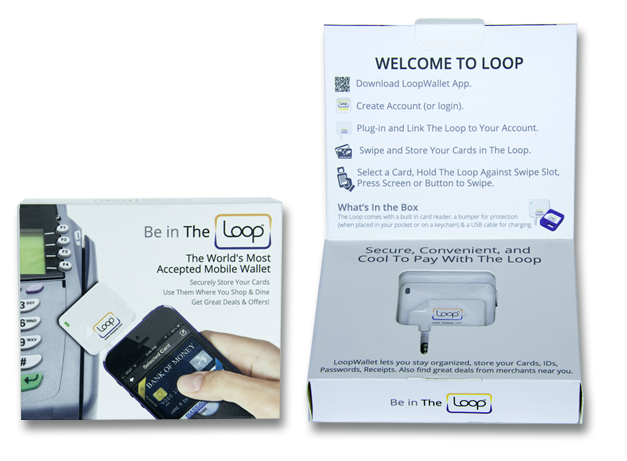 |
| The Loop Fob Wallet AppCessory Packaging |
Loop Wallet Set-Up
Once I downloaded the LoopWallet application from the iPhone store (Android version to be introduced shortly), I simply signed-up for the service and answered a series of security questions within the app. The securitization was complete after I entered an activation token that was sent to my connected email account.
Loading my cards was done using the card reading component of the fob while the fob was connected to my iPhone. A nice feature of the scanning process was the optional feature of adding a picture of my cards, the customer service phone numbers for for each card and an example of my signature. I could also add gift and loyalty cards as well as my drivers license to be part of my Loop Wallet.
The last step of the initialization process was to designate a default card that would be used when the fob is disconnected from my phone (the majority of my transactions have been with the fob disconnected). The default card can be changed at any time when the fob is connected to the phone. The tutorial below was a great way to understand the application process and usage of the Loop Fob.


